Last-Minute Bali Visa Extension: What to Do If Your Permit Expires Today
If your Bali stay permit expires today, contact Visa BaliEasy immediately—even if you discover the problem late at night. An

Last reviewed: 1 November 2026
Molina was the name used for Indonesia’s earlier online visa portal. It has been replaced by eVisa. If you are looking for the Molina Indonesia visa website, use the current official Indonesian eVisa portal: evisa.imigrasi.go.id.
Older articles and saved links may use the Molina name. Before entering passport details or making a payment, check that you are on the current official portal. Visa BaliEasy is a private assistance service, separate from Indonesian Immigration.
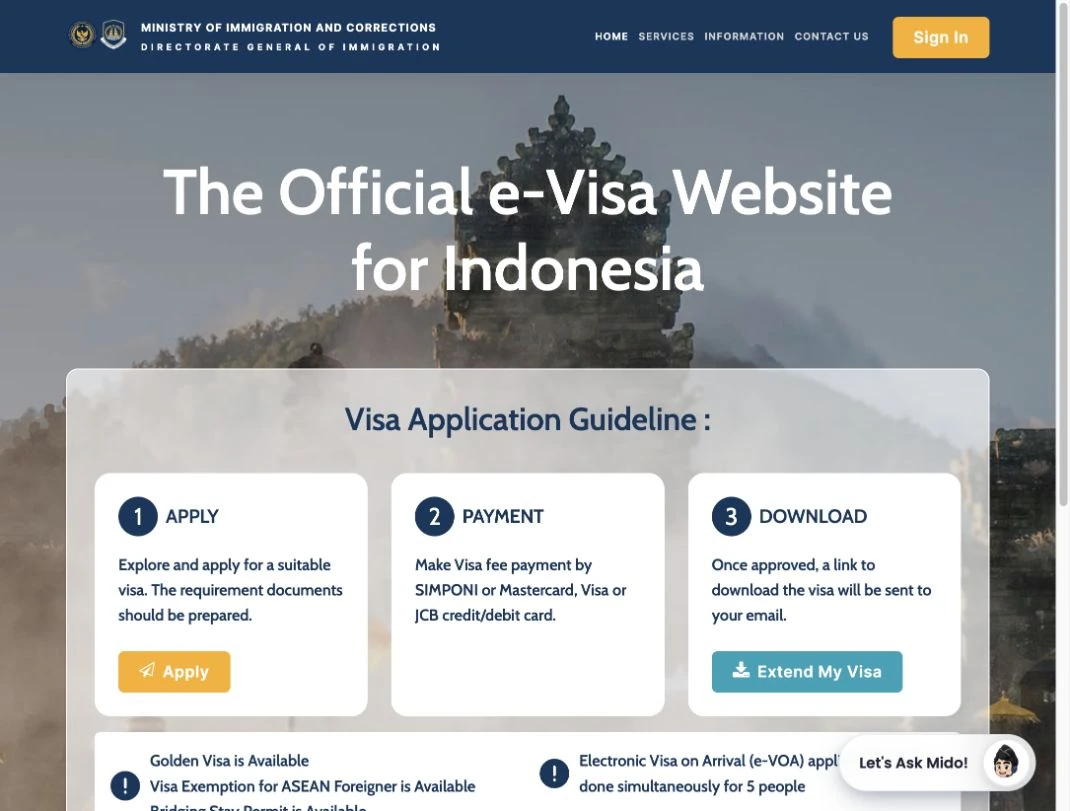
The public homepage at evisa.imigrasi.go.id, captured on 1 November 2026. It shows the Immigration header, Sign In, the Apply–Payment–Download guidance, Extend My Visa, and the “Let’s Ask Mido!” help widget. The interface may change.
The screenshot shows the public homepage, not an applicant’s account or an approval screen. Apply starts visa selection, while Sign In opens access to an existing account. The three guidance panels explain applying, paying and receiving a visa download link by email after approval. Extend My Visa is a separate entry point for an existing stay; it is not a shortcut to a new visa approval.
The homepage also provides Track Your Application further down the page. Check the domain as well as the appearance: a copied logo or a similar-looking page does not establish that a website is official.
| Your task | Start here |
|---|---|
| Apply for a visa | Open the official eVisa portal and select the visa matching your passport, activities and intended stay. |
| Check a pending application | Use the account or application route used for the original submission. |
| Find an approved visa | Check the registered email and the relevant application record. |
| Extend an existing stay | Check the actual permit category, expiry and available extension procedure. |
| Complete an arrival card | Use All Indonesia, a separate arrival-declaration service. |
Visa approval, an arrival card and the Bali tourist levy serve different purposes. Completing one does not automatically complete the others.
Start with the reference number and email address used when you applied. Check the application record for messages, payment confirmation and any request for correction.
For the public tracking route, open Track Your Application. The page checked on 1 November 2026 offers Visa and Stay Permit options and asks for a Register Number and Passport Number. Use the option and matching details for your application.
If an agency or guarantor submitted it, ask them to inspect the submitting account. A new account may not show an application submitted through a different account. Do not treat an empty dashboard as proof that the application was rejected or never submitted.
For a pending C1 application, follow our C1 waiting-verification guide. For a broader status question, see Indonesia visa waiting verification.
Check the domain and any maintenance notice first. For a loading or browser problem, try an updated browser or another connection, and record the exact error and time if it continues.
A 403 error or timeout does not, by itself, tell you anything about the decision on your visa. Avoid starting a replacement application simply because the website is temporarily inaccessible. Use the contact options published on the official portal if the issue persists.
Separate three records: the payment message on the portal, your bank transaction and the application status. A bank notification alone may not show whether the application has received payment confirmation.
Save the transaction reference and error message. Check with the payment provider and the official support channel before paying again if the first transaction is unclear. Never assume an error means that no money was taken.
Search the email account used for the application, including spam and junk. Then check the relevant application record. If an agency submitted it, ask whether the approval was sent to the agency’s registered email.
Verify the name, passport number, visa category and validity on the issued document. An application receipt or successful payment is not the same as an approved visa.
Check your permitted-stay expiry and the extension procedure for your current permit. Do not confuse a new offshore visa application with an extension of the stay you already hold.
Our visa-extension guide explains where to start. The applicable requirements depend on your permit and application route.
Use the portal’s official Contact Us page for government contact details. When checked on 1 November 2026, it listed evoa@imigrasi.go.id. Follow the current instructions on that page and ask which channel handles your particular visa or technical issue; the listed email does not promise a response time or faster approval.
The public homepage also shows “Let’s Ask Mido!”, an on-site help widget. Use it for guidance where available, and distinguish general assistance from the decision recorded on your own application.
When requesting support, describe the problem, date and time, visa category and exact error. Keep a redacted screenshot and the payment reference if relevant. Share any additional identifying information only through the verified channel when necessary; never send passwords, OTPs or full card details.
Contact BaliEasy with the visa category, current status, relevant dates and a short description of the issue. The team can assess the available assistance. Keep passwords, OTPs and complete passport details out of public comments.
If your Bali stay permit expires today, contact Visa BaliEasy immediately—even if you discover the problem late at night. An
If you’re currently in Bali on a C1 Tourist Visa and want to extend your stay for another 120 days,